Areas of the Lathe
Headstock
The headstock is the entire left end of the lathe. It houses the spindle, motor, and most of the machine's gearing and switches. This is where you set how the machine will cut: spindle speed, feed rate, and direction. You'll control the cut from the carriage, but the headstock sets the speeds and feeds.
Caution:
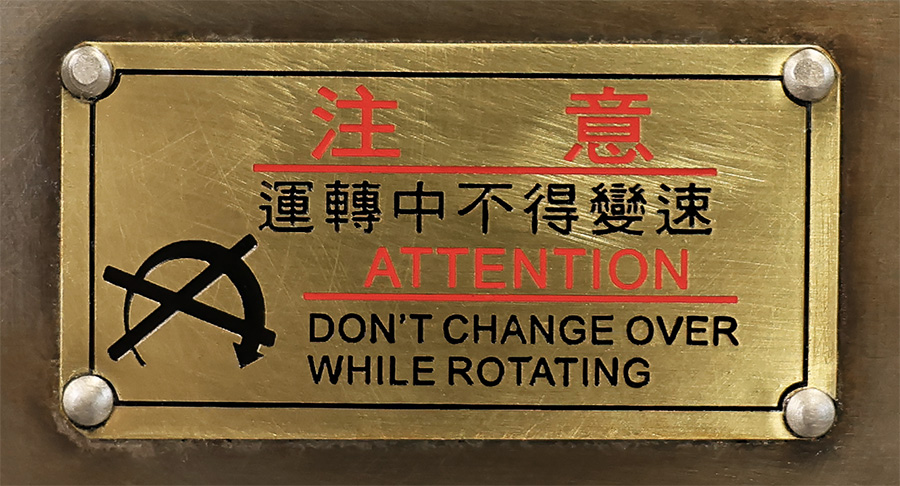
None of the gears on the headstock may be changed while the spindle is rotating. Stop the spindle before changing gears.
Spindle
The spindle tube is the rotating portion of the headstock. Workholding attachments, like the 3-jaw chuck, are mounted to the spindle nose. For accurate mounting of work holding attachments, both the internal and external tapers are precision-ground, and so are the two flat surfaces. Many attachments are secured to the spindle nose taper by the six cam-locks.
This video (below) shows the chuck being mounted to the spindle. Note that the only time it is acceptable to leave a key in the spindle without your hand on it is while mounting a chuck; I check that the lathe is powered off and tap the jog button to double check. At any other time, leaving a key in the spindle or a chuck is a safety violation.
Chuck
Work-holding attachment mounted to the spindle.
Spindle Speed Controls
Two gear levers and one electric switch control how fast the spindle will turn, in Revolutions Per Minute (RPM). The available speed settings are given on the RPM chart.
Tool Feed Rate Gears
Control how far the tool moves per spindle revolution. Set the gear levers and knob based on the feed chart.
Feed Direction
Selects tool feed direction (toward/away in the active axis), or neutral to disengage power feed entirely.
Feed / Thread Selection
Select between normal power feed or threading. Unlike power feed, threading syncs tool movement with spindle rotation. Available threads are listed on the thread chart.
When set for power feed, the feed rod will be powered. When set for threading, the lead screw will be powered.
Some combinations of gears will power both the lead screw and the feed rod, regardless of the feed/thread selection. This should highlight that only the gear settings listed on the charts are valid. There are many more gear settings that are invalid that may damage the lathe.
Jog Button
If the main power is switched on and the spindle clutch lever is in neutral, pressing in the jog button will power up the spindle. It's a momentary switch, so the spindle will only stay on while the button is being held.
Electric Box
The electrical "brains" of the lathe, mostly fuses and contactors, are behind the panel. There are no digital components in these machines, just old-school wires and switches.
The panel has three switches and a lamp:
- Main Power Switch:
Turns the lathe on and off. For safety, switch off the lathe during set up and while measuring your workpiece.
- Spindle Speed Range Switch:
Selects the speed range for the spindle.
The OFF position is a labeling error: the switch rotates between LOW and HIGH without stopping at OFF.
- Coolant Pump Switch:
Activates the coolant pump, and the indicator lamp.
We don't use coolant on the manual lathes at BTC: it's a huge mess and unnecessary for the materials we work with.
Carriage
The carriage moves the tool. All tool motions, longitudinal, cross, and compound, are stacked on the carriage. This is where you control the cut: tool position, spindle start/stop, and manual or power feed.
Apron
The apron is the front face of the carriage, and where many of the controls are found.
-
Spindle Clutch Lever: Starts the spindle forward or reverse.
- Up: Spindle Forward (Clockwise)
- Center: Stop
- Down: Spindle Reverse (Counter-Clockwise)
- Longitudinal Hand Wheel:
Moves the carriage in the long direction / Z-axis. The Z-axis Micrometer Collar is behind the handwheel: rotate the collar to set a zero. The collar's position is held by friction.
-
Power Feed: Axis Selection and Start/Stop:
- Left & Up: longitudinal feed (Z-axis)
- Center: stop.
- Right & Down: cross feed (X-axis)
- Half-Nut Lever:
start/stop for threading. Named for its mechanical design, which engages the lead screw by closing two halves of a nut around it.
- Threading Dials:
Tells you when to start during threading, so that each pass lines up with the previous.
- Power Feed Auto-Stop:
Stops the feed at a preset location, but only works for one tool and one location. We don't use it because it's usually more hazardous than helpful.
Cross Slide
Moves the tool across the work / in diameter / the X-axis.
Used for facing. Also used to control the depth of cut and workpiece diameter in OD (Outside Diameter) turning.
The cross slide micrometer collar is secured by a threaded locking nut. Loosen the locking nut by turning it counterclockwise, rotate the collar into position, and then tighten the locking nut.
Compound Rest
Can be rotated during setup to cut chamfer and tapers. Also used during single-point threading.
The compound rest lock should be tightened when the compound rest is not being used to prevent it from moving under cutting forces.
Quick Change Tool Post
Secures the tool-holder and can be rotated to set the cutting-edge of the tool to the intended cut.
Tailstock
Sliding on the ways at the right end of the lathe is the tailstock. It has a quill with a Morse taper, which can hold various attachments. The tailstock has two primary uses: drilling holes and supporting the end of a workpiece.
Quill
Has a Morse taper to hold attachments, like the live center or drill chuck. Extends or retracts when the handwheel is turned.
Quill Handwheel
Crank to extend or retract the quill. The quill micrometer collar is behind the handwheel.
Quill Fast / Slow Lever
Set the lever to the right for slow feed and high force when drilling or driving the live center into the (center drilled) end of the workpiece. Set the lever to the left for fast feed and low force, for the retract & recover moves when peck drilling, or when reaming.
Quill Lock
Prevents the quill from moving. This is useful when using a live center, to prevent the center from losing contact with the workpiece.
Tailstock Position Lock
Prevents the tailstock from sliding along the ways. The tailstock should always be locked down while in use, otherwise the tailstock would just slide away instead of the drill drilling.
Alignment / Offset Adjustment
A pair of opposing screws, used to align the axes of the tailstock and spindle for all on-center operations, or to offset the tailstock by some amount for turning tapers between centers. The small offset scale, below the handwheel, reads an approximate offset distance.
Bed
The lathe's ability to produce precise parts is derived from the quality of its cast iron, the precision ground surfaces of the ways, and their alignment with the spindle axis. The bed, and the ways, are the geometric master for everything the lathe makes.
Ways
The ways are the precision-ground surfaces on the bed of the lathe that guide the movement of the carriage and tailstock. They ensure smooth and accurate linear motion along the length of the lathe.
Maintaining the ways is critical to the lathe's ongoing ability to produce accurate and precise parts: be careful to avoid dropping anything hard or heavy on the ways, like hand tools. If any part of the ways are dinged or otherwise upset, the carriage will be forced to ride over those bumps, changing the size and form of your part.
Transmission Shafts
There are three shafts that run the length of the bed. Each of these connect the headstock to the carriage for different purposes.
From top to bottom:
- Lead Screw: transmits mechanical power to the carriage when the headstock is set for threading.
- Feed Rod: transmits mechanical power to the carriage when the headstock gears are set for power feed.
- Spindle Clutch Rod: connected to the spindle clutch lever. When the clutch lever moves, the rod rotates a cam against an electrical switch inside the headstock. That switch controls the electrical power to the spindle motor.
Power Feed Auto Stop Rod
Cam collars can be positioned along the auto stop rod wherever the carriage should disengage power feed. The power feed will disengage when the plunger rides up the shoulder of a cam collar. The whole rod can be rotated to enable or bypass each cam collar. We don't use the auto stop because it only works as expected for the specific tool and location the collar is set to... if you adjust almost anything the tool will stop somewhere different. So, the auto stop function is usually more hazardous than helpful.
Base
The cast iron base gives the lathe its rigidity. It supports the bed and headstock, maintaining their alignment under load.
Leveling Feet
The six feet are adjusted to level the lathe. Leveling a machine is a high precision process where the direction of gravity is used as a datum (reference) from which the twist and bow of the ways can be measured. The feet can then be adjusted to remove the twist and bow, so that the ways are straight and parallel to the spindle axis.
Foot Brake
The foot brake will disconnect power from the spindle motor and stop the spindle's rotation quickly with only light pressure. For safety, always check that the foot break on the machine you are using is operating correctly before you begin machining.
Turning Tools
Several tools are kept at each lathe. This selection covers all the most common turning operations, and then some.
The tools with a four-letter code use indexable tungsten-carbide inserts, which are basically replaceable cutting edges. "Indexable" means that each insert has several edges that can be used: when an edge goes dull, the insert can be rotated or flipped to find a sharp edge.
The first letter of the code (C or D) indicates the shape of the insert: C means an 80° rhombus and D is for a 55° rhombus. The last three letters (NMG) each mean something specific, but for now you can read “NMG” as “the normal kind.” You'll learn more about insert codes as they become relevant, particularly once you start learning setup for CNC machining.
Warning:
Do not attempt to use the parting blade without following its setup instructions carefully. The blade will break during cutting if not set up correctly.
Right-Hand CNMG
The most used to remove material from the outside diameter (OD) of the workpiece, cutting from right to left (toward the chuck). May be referred to as “the RH-OD tool” in some lessons.
LH-CNMG
The mirror-image of the RH-OD tool. Frequently used for facing, or, much less commonly, may be used for OD turning if it's necessary to cut from left to right (away from the chuck). May be referred to as “the facing tool” in some lessons.
RH-DNMG
Similar in general use to the RH-OD tool, but its narrower profile affords additional clearance when turning close to the live center. The narrower angle also means the insert is weaker and more prone to chipping or dulling.
Grooving and Parting Blade
A High Speed Steel (HSS) tool, 0.125” wide, used to cut grooves into the diameter of the workpiece. Grooving all the way to center, called parting off, is used to separate your part from the stock material held in the chuck.
HSS Threader
Another High Speed Steel (HSS) tool, shaped and sharpened by off-hand grinding. Used to cut threads on the OD of a workpiece.
Digital Read Out (DRO)
The DRO is used with, or instead of the micrometer collars on the carriage and cross slide to measure tool positions and distances traveled. It displays the Z-axis (longitudinal direction) and the X-axis (diameter or cross direction). The DRO also has many other functions beyond these basics, and they will be introduced much later.